What Is LCP?
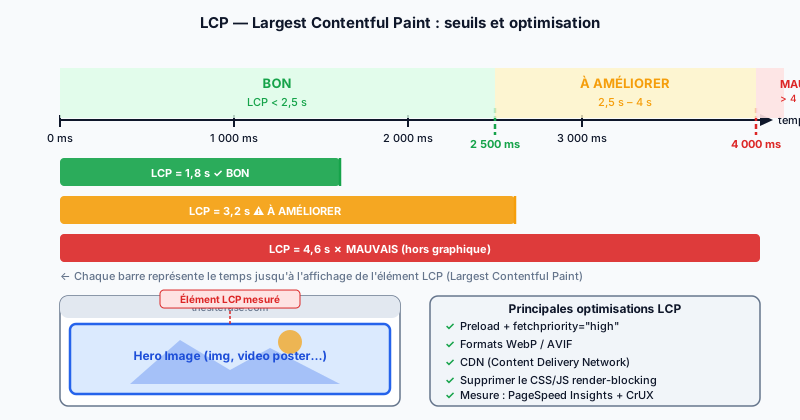
LCP (Largest Contentful Paint) measures the time between the start of navigation and when the largest visible element in the viewport is rendered. This element can be an <img> tag, a <video> poster image, a CSS background image, or a large text block. LCP is one of the three Core Web Vitals (essential web experience metrics) that Google uses as a ranking signal since the Page Experience Update was deployed in 2021.
Google's Performance Thresholds
Google has established three performance zones for LCP:
- Good: LCP below 2.5 seconds — satisfactory user experience.
- Needs improvement: LCP between 2.5 and 4 seconds — optimization recommended.
- Poor: LCP above 4 seconds — negative impact on ranking and bounce rate.
These thresholds are measured at the 75th percentile of real visits, via CrUX (Chrome User Experience Report), which aggregates anonymized field data from Chrome users.
Main Causes of a Slow LCP
Four factors account for the majority of poor LCP scores:
- Slow server: a high TTFB (Time to First Byte) delays everything else. Overloaded shared hosting or lack of server-side caching are frequent causes.
- Render-blocking CSS: stylesheets block rendering. Large non-critical CSS loaded in
<head>delays the paint. - Unoptimized images: a 3 MB JPEG where a 200 KB WebP would suffice multiplies load time.
- Render-blocking JavaScript: scripts without
asyncordeferblock the HTML parser and delay rendering.
Key Optimizations
To improve LCP, act on several levers:
- Preload the LCP image: add
<link rel="preload" as="image" href="hero.webp" fetchpriority="high">in<head>so the browser loads the image as soon as HTML is discovered, without waiting for CSS or JS. - Modern formats: WebP reduces image size by 25–35% compared to JPEG; AVIF offers even greater savings for compatible browsers.
- CDN (Content Delivery Network): bring your static resources closer to the end user.
- Eliminate render-blocking: load critical CSS inline and defer the rest; add
deferto non-essential scripts.
Measuring LCP
Two reference tools let you measure LCP:
- PageSpeed Insights: combines lab data (Lighthouse) and CrUX field data for your specific URL.
- Chrome DevTools: in the Performance tab, recording a page load displays the LCP marker on the timeline and identifies the element involved.
Always prioritize field data (CrUX) over lab data for SEO, because Google bases its ranking on real user experience, not simulations.
Improve Your LCP with a Free Audit
A poor LCP penalizes both your search ranking and your site's conversion rate. Run a free audit to get a precise diagnosis of your Core Web Vitals and a prioritized action plan.