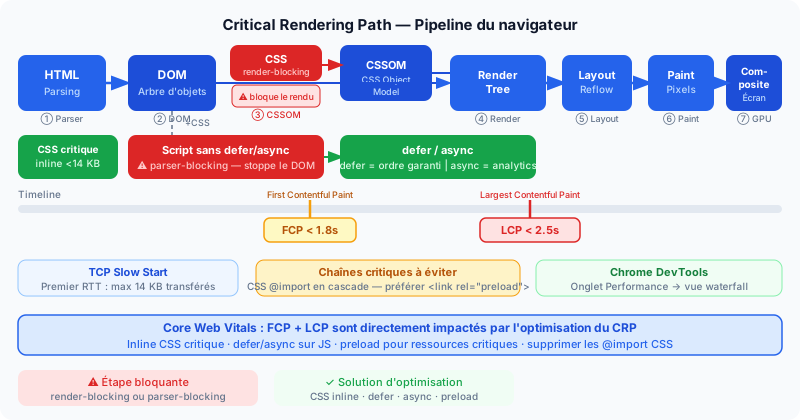
Steps of the Critical Rendering Path
The CRP (Critical Rendering Path) refers to the sequence of operations a browser performs to display the first visible frame on screen. It includes the following steps:
- HTML → DOM — The browser parses HTML and builds the DOM (Document Object Model), a tree representation of the page structure.
- CSS → CSSOM — In parallel, CSS is parsed to build the CSSOM (CSS Object Model), the DOM equivalent for styles.
- Render Tree — The DOM and CSSOM are combined to form the Render Tree, which contains only visible elements with their computed styles.
- Layout — The browser calculates the position and size of each element (also called Reflow).
- Paint — Pixels are drawn onto layers.
- Composite — Layers are assembled and sent to the screen.
Render-Blocking Resources: CSS
CSS is render-blocking: the browser does not build the Render Tree until all CSS is downloaded and parsed. A heavy CSS file loaded in the <head> therefore delays the first frame.
The solution is inline critical CSS: extract the CSS needed to render the initially visible portion (above-the-fold) and insert it directly in a <style> tag in the <head>. The remaining CSS is loaded asynchronously. Keep this critical block under 14 KB: that is the maximum size transmitted in a single network round-trip during TCP connection startup (TCP slow start).
Parser-Blocking Resources: JavaScript
By default, a <script> tag in HTML stops document parsing until the script is downloaded and executed. This is the parser-blocking behavior.
Two attributes prevent this:
defer— the script is downloaded in parallel with parsing and executed after parsing completes, in declaration order. Preferred for scripts that depend on the DOM.async— the script is downloaded in parallel and executed as soon as the download finishes, with no guaranteed order. Ideal for independent scripts such as analytics tools.
FCP and LCP: Two Key Metrics
CRP optimization directly impacts two Core Web Vitals metrics:
- FCP (First Contentful Paint) — when the first content (text, image) is displayed. Target: under 1.8 seconds.
- LCP (Largest Contentful Paint) — when the largest visible element is rendered. Target: under 2.5 seconds. This metric is most directly tied to the CRP.
Eliminating Critical Resource Chains
A critical resource chain occurs when resource A must be loaded before resource B is discovered (e.g., a CSS file that imports another CSS with @import). Each link lengthens the time before the first render. To detect them, use Chrome DevTools → Performance tab → waterfall view, which shows the order and duration of each request.
Prefer direct imports in HTML over chained CSS @import, and use <link rel="preload"> for critical resources discovered late (fonts, LCP images).
Analyze Your Initial Render
Are blocking resources slowing down your first frame? Run a free audit to get an analysis of your CRP, Core Web Vitals metrics and priority recommendations.