Why Compress Web Resources?
Compression reduces the size of files transferred between the server and the browser. A 100 KB HTML file can be reduced to 20-30 KB with good compression, cutting download time proportionally to available bandwidth. The impact is especially significant on mobile connections or high-latency networks.
The most compressible file types are text-based: HTML, CSS, JavaScript, JSON, XML and SVG. Images and videos are already compressed in their native formats (JPEG, PNG, WebP, MP4) and do not benefit from HTTP compression.
Gzip: The Standard Since 1992
Gzip is a compression algorithm created in 1992, based on the combination of two algorithms: LZ77 (which eliminates repetitions by referencing previously seen sequences) and Huffman coding (which encodes frequent symbols using fewer bits). It is supported by 100% of browsers and virtually all servers since the early 2000s.
Gzip typically achieves compression ratios of 60 to 70% on well-structured HTML. Its main advantage is the speed of compression and decompression, reducing CPU load on the server side.
Brotli: Google's Algorithm (2015)
Brotli was developed by Google in 2015 and standardised as an HTTP encoding via RFC 7932. It builds on the same foundations as Gzip (LZ77 + Huffman) but adds a pre-trained static dictionary containing 13,000 common web words and phrases (frequent HTML tags, CSS properties, JavaScript keywords). This dictionary allows common sequences to be referenced without transmitting them, noticeably improving compression ratios.
Brotli is now supported by 95%+ of modern browsers, including Chrome, Firefox, Safari and Edge.
Compression Gain Comparison
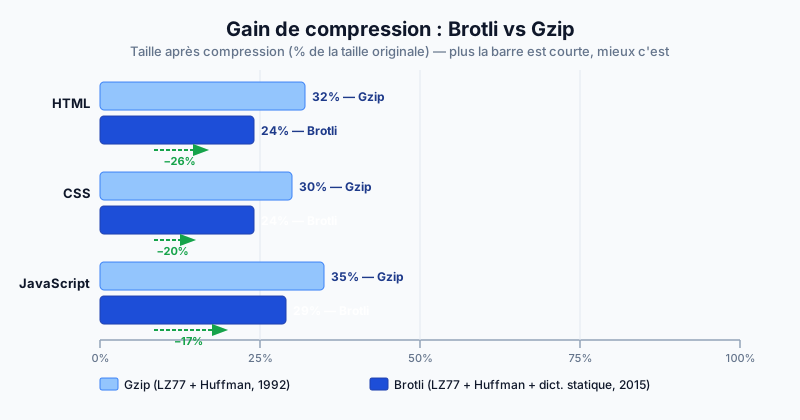
Independent studies (notably Akamai's 2016 analysis) show Brotli's gains over Gzip at equivalent compression levels:
- HTML: Brotli compresses approximately 26% better than Gzip
- CSS: approximately 20% better
- JavaScript: approximately 17% better
These gains are achieved at compression level 5-6 (out of 11 available levels), which offers the best balance between compression ratio and server-side computation time.
Server-Side Negotiation: The Accept-Encoding Header
With each HTTP request, the browser announces the encodings it supports via the Accept-Encoding header:
Accept-Encoding: br, gzip, deflatebr refers to Brotli. The server picks the best supported encoding and signals it via the response header Content-Encoding: br or Content-Encoding: gzip. If Brotli is not supported, the server automatically falls back to Gzip.
Enabling Brotli on Apache and Nginx
On Apache 2.4.26+, enable the mod_brotli module:
a2enmod brotliThen in your configuration:
BrotliCompressionQuality 5
AddOutputFilterByType BROTLI_COMPRESS text/html text/css application/javascript
On Nginx, install the ngx_brotli module and add:
brotli on;
brotli_comp_level 5;
brotli_types text/html text/css application/javascript;
To verify activation:
curl -H "Accept-Encoding: br" -I https://your-site.comIf the response contains Content-Encoding: br, Brotli is active.
Optimise Your Site's Compression
Brotli and Gzip must be properly configured for each resource type, with the right compression levels and correct MIME types. Run a free audit to check whether your site uses Brotli, whether compression is enabled for all text resources, and identify uncompressed files that are slowing down your pages.