IPv4 and IPv6: Two Generations of Addresses
IPv4 (Internet Protocol version 4) uses 32-bit addresses, yielding approximately 4.3 billion unique addresses. That may sound vast, but the explosion of connected devices depleted this pool: in 2011, the IANA (Internet Assigned Numbers Authority, the body managing global IP address allocation) distributed its last available IPv4 block.
IPv6 (Internet Protocol version 6) solves this with 128-bit addresses, providing 340 sextillion possible addresses — a number so large it will never be exhausted on a human timescale. An IPv6 address looks like this: 2001:0db8:85a3::8a2e:0370:7334.
Dual-Stack: Answering Both Protocols
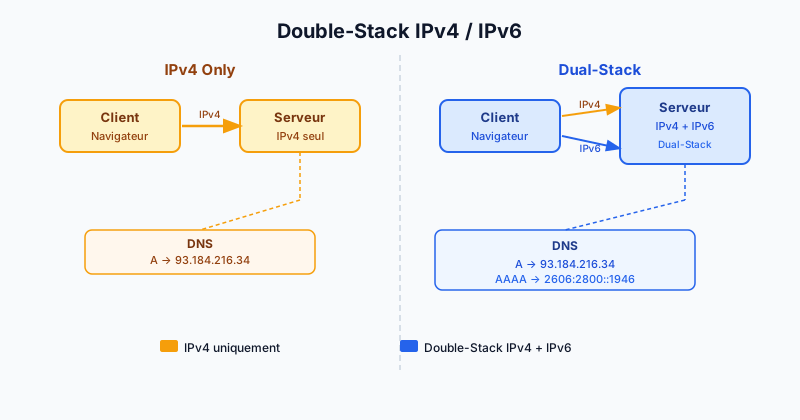
Dual-stack is a configuration where a server simultaneously handles both IPv4 and IPv6 connections. It is not a replacement strategy but a coexistence one: visitors whose ISP (Internet Service Provider) supports IPv6 connect through it automatically, while others continue via IPv4.
This approach is recommended by the IETF (Internet Engineering Task Force, the Internet standards body) as a gradual migration strategy. It avoids any service disruption during the IPv6 transition.
DNS A and AAAA Records
On the DNS (Domain Name System) side, two record types are involved:
- A record: maps your domain to an IPv4 address (e.g.
93.184.216.34). - AAAA record (pronounced "quad-A"): maps your domain to an IPv6 address (e.g.
2606:2800:220:1:248:1893:25c8:1946).
To enable dual-stack, simply add an AAAA record to your DNS zone alongside your existing A record.
Checking Your Configuration with dig and nslookup
The dig (Domain Information Groper) command queries DNS servers from a terminal:
dig A example.com
dig AAAA example.com
With nslookup (available on Windows, macOS and Linux):
nslookup -type=AAAA example.comIf the AAAA response is empty, your server is not yet reachable over IPv6.
SEO Impact and Google's Recommendations
Google officially encourages IPv6 adoption and prioritises it when both protocols are available. While IPv6 alone is not a direct ranking factor, it improves connection speed for native IPv6 users (no intermediate NAT64 translation), which positively affects Core Web Vitals (performance metrics measured by Google).
Furthermore, some mobile carriers now assign only IPv6 addresses to their subscribers, making a site without IPv6 less accessible from those networks.
Enabling IPv6 on Apache and Nginx
On Apache, ensure your VirtualHost listens on all IPv6 interfaces:
Listen [::]:80
<VirtualHost [::]:80>
    ServerName example.com
</VirtualHost>
On Nginx, add the listen [::]:80 directive:
server {
    listen 80;
    listen [::]:80;
    server_name example.com;
}
In both cases, your hosting provider must have assigned an IPv6 address to your server and your network interface must be configured accordingly.
Audit Your Network Configuration Today
Manually verifying your server's IPv6 configuration can be complex, especially when DNS, the web server and firewall are all involved. Run a free audit to get a complete diagnosis of your network infrastructure, including IPv6 compatibility and your DNS records.