What Is Open Graph?
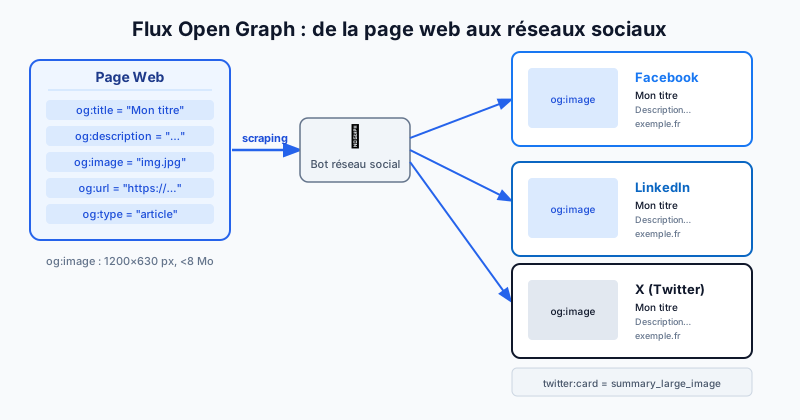
Open Graph is a protocol created by Facebook in 2010 to standardise how web pages present themselves when shared on social networks. Today it is adopted by all major platforms: Facebook, LinkedIn, X (formerly Twitter), WhatsApp, Slack and many others.
Without Open Graph tags, these platforms attempt to guess the title, description and image to display — often with disappointing results. OG (Open Graph) tags give the webmaster precise control over what appears in every link preview.
The Essential Open Graph Tags
These tags are placed in the <head> of your HTML page:
- og:title: the title shown in the preview (can differ from the SEO title)
- og:description: a short page description (150-200 characters recommended)
- og:image: the URL of the preview image
- og:url: the canonical URL of the page
- og:type: the content type —
websitefor general pages,articlefor blog posts
Example HTML code:
<meta property="og:title" content="My article" />
<meta property="og:description" content="A concise description." />
<meta property="og:image" content="https://example.com/image.jpg" />
<meta property="og:url" content="https://example.com/my-article" />
<meta property="og:type" content="article" />
The og:image Tag: Dimensions and File Size
The image is the most visible element of any link preview. Facebook recommends a size of 1200 × 630 pixels to display correctly on all screens, including Retina resolutions. The file size should stay below 8 MB, but targeting 200-400 KB is best practice to ensure fast loading.
Use an absolute URL (starting with https://) and avoid images hosted behind authentication or a firewall.
Twitter Cards: Tags Specific to X
X uses its own system called Twitter Cards alongside OG tags. The key tags are:
- twitter:card: card type —
summary(small thumbnail) orsummary_large_image(large image) - twitter:site: your site's X account (e.g.
@youraccount)
If Twitter Card tags are absent, X falls back to standard OG tags, which generally works well.
Testing Your Open Graph Tags
Two official tools let you preview your tags before publishing:
- Facebook Sharing Debugger:
developers.facebook.com/tools/debug/— it scrapes your URL and shows the preview exactly as Facebook will see it. It also lets you force a cache refresh. - Twitter Card Validator:
cards-dev.twitter.com/validator— previews how your content appears on X.
These tools also flag errors such as a missing image, a title that is too long, or a non-canonical URL.
Audit Your Social Tags for Free
Misconfigured Open Graph tags reduce click-through rates on shares and harm your brand image. Run a free audit to check all your meta tags — Open Graph, Twitter Cards, SEO tags — and fix errors before they cost you visitors.