The Problem with Legacy Formats
JPEG, PNG, and GIF have been the dominant image formats since the 1990s. JPEG sacrifices quality to compress photos. PNG preserves every pixel but produces heavy files. GIF allows animation but is limited to 256 colors. These three formats share one thing: their compression algorithms are old, and their modern successors do much better at equivalent quality.
Image weight is the leading cause of slow web pages. Lighter images mean an improved LCP (Largest Contentful Paint), a higher Core Web Vitals score, and less data consumed on mobile.
WebP: Google's Format
Launched by Google in 2010, WebP uses the VP8 codec for lossy compression and VP8L for lossless compression. Its advantages over JPEG and PNG:
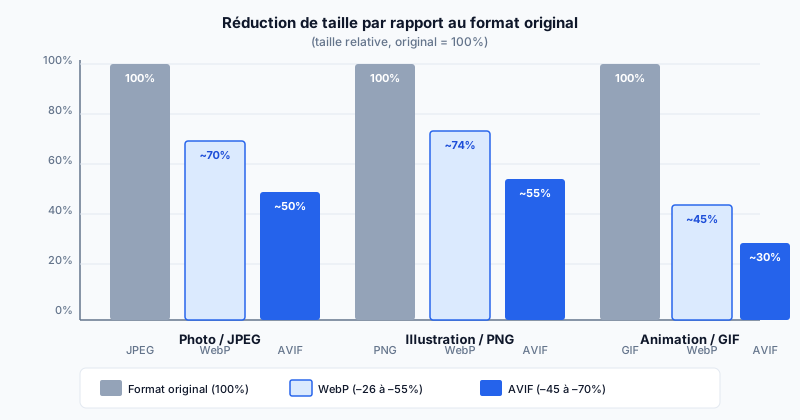
- Lossy compression: 25 to 34% lighter than JPEG at equivalent visual quality.
- Lossless compression: 26% lighter than PNG.
- Supports transparency (alpha channel) like PNG, unlike JPEG.
- Supports animations like GIF, but with far superior compression.
In 2025, WebP is supported by 97% of browsers — practically universal.
AVIF: Maximum Compression Successor
AVIF (AV1 Image File Format) is developed by the Alliance for Open Media (a consortium including Google, Netflix, Apple, Mozilla) and published in 2019. It uses the AV1 codec, originally designed for video, applied to still images.
- Lossy compression: up to 50% lighter than JPEG at identical quality.
- Supports HDR (High Dynamic Range) and 10-bit color depth.
- Supports transparency and animations.
Compatibility is progressing rapidly: 92% of browsers in 2025 (Chrome 85+, Firefox 93+, Safari 16+). Internet Explorer and older Safari do not support it.
The picture Tag and Fallback
The <picture> tag allows you to offer multiple formats and let the browser choose the best supported one:
<picture>
  <source srcset="image.avif" type="image/avif">
  <source srcset="image.webp" type="image/webp">
  <img src="image.jpg" alt="Description" width="800" height="600">
</picture>
AVIF-compatible browsers load the first source. Others fall back to WebP, then JPEG as a last resort. The srcset attribute on <img> also handles responsive images (different sizes depending on screen resolution).
Conversion Tools
Several tools allow you to convert your existing images:
- cwebp and avifenc: official command-line tools.
- ImageMagick: versatile converter with WebP and AVIF support.
- Squoosh: Google's free web interface to compare formats and quality.
- Sharp (Node.js): high-performance library for automated build pipelines.
Audit Your Image Weight
An audit automatically identifies images still served as JPEG or PNG that could be converted, and estimates the achievable size gains. Run a free audit to discover how many KB your site can save by adopting WebP and AVIF.