Why Fonts Slow Down Your Site
Web fonts are loaded from an external server (like Google Fonts) or your own hosting. This loading requires an additional network request that can block rendering of text. The result: your page appears ready but the text is not visible — or it visually jumps when the font loads.
Two Core Web Vitals metrics are directly affected: LCP (Largest Contentful Paint) if the main text is delayed, and CLS (Cumulative Layout Shift) if the font causes a visual jump.
FOIT and FOUT: Two Default Behaviors
Browsers adopt two default strategies when a font has not yet loaded:
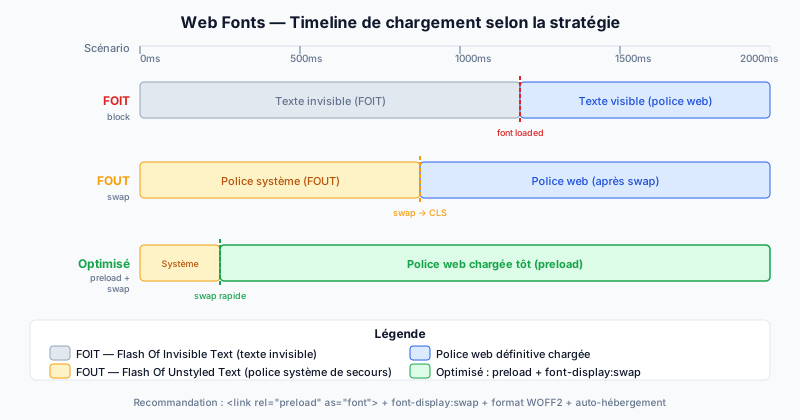
- FOIT (Flash Of Invisible Text): text is rendered invisible during font loading, then appears all at once. The user sees a blank space. Safari used this as its default behavior.
- FOUT (Flash Of Unstyled Text): text first displays with a fallback system font, then is replaced by the web font once loaded. This abrupt change causes CLS.
font-display: Controlling the Behavior
The CSS property font-display inside your @font-face declaration lets you precisely control this behavior:
auto: browser default behavior.block: text invisible for 3 seconds (forced FOIT), then falls back to system font.swap: immediately displays the system font, then swaps to the web font as soon as it's available. Recommended for body text.fallback: text invisible for 100 ms, then system font; if the web font arrives within 3 seconds, swap occurs; otherwise, the system font stays.optional: text invisible for 100 ms, then system font; the web font is only used if already cached. Recommended for maximum performance.
Preloading and Self-Hosting
Preloading tells the browser to download the font as a priority, even before CSS is parsed:
<link rel="preload" href="/fonts/my-font.woff2" as="font" type="font/woff2" crossorigin>Self-hosting Google Fonts offers two advantages: no request to Google servers (GDPR compliance), and reduced DNS latency. Tools like google-webfonts-helper let you download the files and corresponding CSS.
Formats, Subsetting, and Variable Fonts
The WOFF2 (Web Open Font Format 2) format is the most efficient: approximately 30% lighter than WOFF and 50% lighter than TTF. All modern browsers support it.
Subsetting means keeping only the glyphs actually used on your site. If your content is only in English, there is no need to include Cyrillic or Arabic glyphs. The glyphhanger tool automates this process.
Variable fonts consolidate all styles (bold, italic, semi-bold) into a single file. Instead of loading 4 separate files for 4 weights, you load just one — with a significant reduction in the number of requests.
Audit Your Web Fonts
Unoptimized fonts can degrade your LCP by several seconds and generate CLS that penalizes your Google ranking. Run a free audit to identify blocking fonts, verify font-display usage, and detect external requests to Google Fonts impacting your Core Web Vitals.