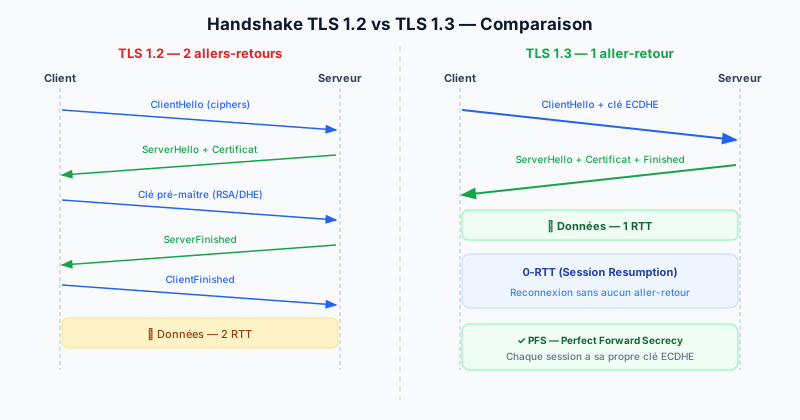
TLS: the web's encryption protocol
TLS (Transport Layer Security) is the protocol that encrypts communications between a browser and a web server. It replaces the now-obsolete SSL (Secure Sockets Layer) protocol. TLS is the mechanism that shows the padlock in the address bar and makes HTTPS connections secure.
In 2025, two versions coexist: TLS 1.2 (2008) and TLS 1.3 (2018). TLS 1.2 is still widely used but has structural weaknesses that TLS 1.3 corrects.
Problems with TLS 1.2
- Weak algorithms allowed: TLS 1.2 supports obsolete, vulnerable algorithms (RC4, 3DES, MD5, RSA without forward secrecy)
- 2 round-trip handshake: the handshake (initial negotiation to establish the encrypted connection) requires 2 RTT (Round-Trip Time), adding measurable latency
- No PFS by default: without PFS (Perfect Forward Secrecy), if the server's private key is compromised, all past sessions can be retroactively decrypted
TLS 1.3 improvements
- 1 round-trip handshake: the encrypted connection is established 1 RTT faster
- 0-RTT for reconnections: a returning client can send data on the first packet — zero handshake latency for resumed sessions
- Mandatory PFS: TLS 1.3 mandates ECDHE (Elliptic Curve Diffie-Hellman Ephemeral) key exchange, ensuring each session has its own unique secret key
- Modern algorithms only: all weak algorithms removed. Only robust cipher suites (AES-GCM, ChaCha20-Poly1305) are allowed
Enable TLS 1.3 on Apache
<VirtualHost *:443>
  SSLProtocol -all +TLSv1.2 +TLSv1.3
  SSLHonorCipherOrder off
</VirtualHost>
Enable TLS 1.3 on Nginx
server {
    ssl_protocols TLSv1.2 TLSv1.3;
    ssl_prefer_server_ciphers off;
}
Should you disable TLS 1.2?
TLS 1.2 remains necessary for compatibility with older browsers. TLS 1.0 and 1.1 must be disabled (deprecated by all browsers since 2020).
Check your TLS version
TheSiteFuse checks which TLS version is active on your server and alerts you if TLS 1.0/1.1 are still accepted. Run a free audit to know your TLS configuration.