What Is a Service Worker?
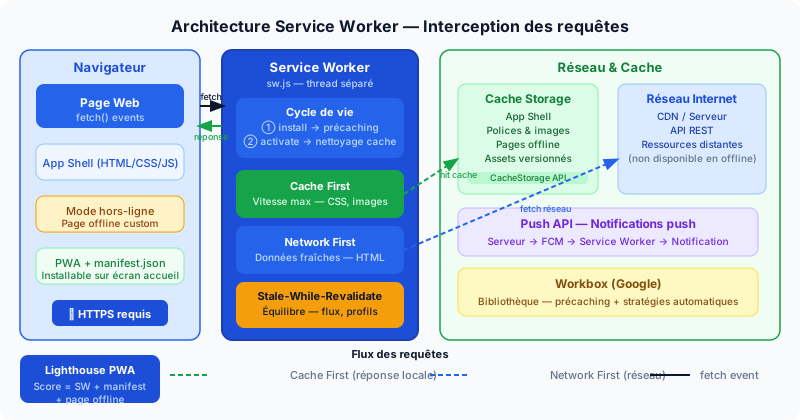
A Service Worker is a JavaScript script that runs in the background, in a thread separate from the main thread (the browser's execution thread that handles the UI). It acts as a programmable proxy: it intercepts every network request made by your page (fetch events) and decides whether to respond from local cache, from the network, or a combination of both.
Unlike Web Workers (parallel scripts without network access), a Service Worker persists between sessions and can run even when no page of your site is open — which is what makes push notifications possible.
Lifecycle
A Service Worker goes through three phases:
- Install — the browser downloads the
sw.jsfile and fires theinstallevent. This is the right time to pre-cache the App Shell (the base structure of your UI). - Activate — the old Service Worker hands over control. The
activateevent is used to delete old cache versions. - Fetch interception — the active Service Worker intercepts all requests from the pages it controls.
Caching Strategies
There is no one-size-fits-all strategy. The choice depends on the type of resource:
- Cache First — responds from cache if available, otherwise goes to the network. Maximum speed. Ideal for fonts, images, versioned CSS/JS files.
- Network First — tries the network first, falls back to cache on failure. Always fresh data. Ideal for dynamic HTML pages.
- Stale-While-Revalidate — responds immediately from cache AND sends a network request to update the cache in the background. Balances speed and freshness. Ideal for news feeds and user profiles.
Offline Mode and PWAs
By caching the App Shell (the minimal HTML + CSS + JS skeleton that structures your UI), you can display a clean "You are offline" page instead of Chrome's generic error page. For more advanced applications, it is possible to serve the entire application in offline mode.
A Service Worker is one of the building blocks of a PWA (Progressive Web App). Combined with a manifest.json file (which defines the app name, icons, and theme color) and served over HTTPS, it allows your site to be installed on a smartphone's home screen — just like a native application.
Workbox and Push Notifications
Workbox is an open-source library created by Google that wraps caching strategies into a few lines of configuration, avoiding the need to write a Service Worker from scratch. It also handles cache entry expiration and automatic precaching.
The Push API relies on the Service Worker to receive notifications even when the browser is closed. The server sends a message via a push service (FCM for Chrome), the Service Worker receives it and displays the notification.
Two important constraints: the Service Worker requires HTTPS (except on localhost for development) and must be served from the same origin as your site.
Measuring with Lighthouse
Lighthouse (built into Chrome DevTools under the Lighthouse tab) provides a PWA score and flags missing criteria: missing Service Worker, incomplete manifest, unhandled offline page. A high PWA score also contributes to good perceived performance, measured by Core Web Vitals.
Optimize Your Site Now
Is your site taking advantage of Service Workers? Run a free audit to find out if your cache configuration, PWA score and network performance are up to standard.