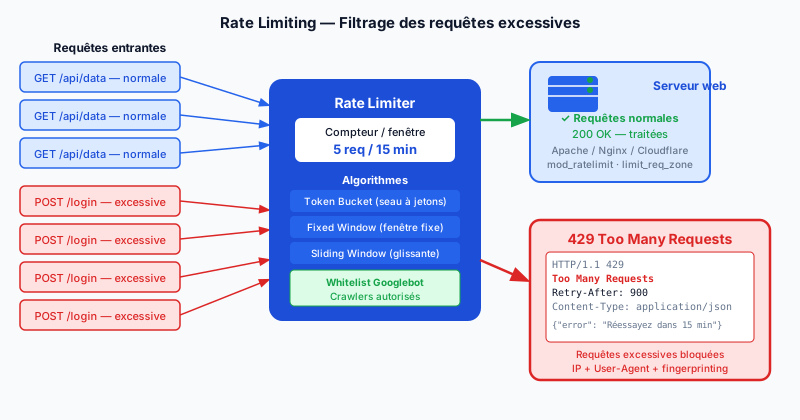
Why Rate Limiting Is Essential
Without rate limiting, your login form is an ideal target for brute-force attacks (systematic password guessing). Attackers also use credential stuffing (automated injection of millions of login/password pairs from data breaches), aggressive scraping (automated content extraction), and application-level DDoS (Distributed Denial of Service) attacks. Rate limiting (request throttling) blocks these behaviors by capping the number of requests accepted per unit of time.
HTTP 429 and the Retry-After Header
When a client exceeds the allowed limit, the server must return HTTP status 429 Too Many Requests. This code is defined in RFC 6585. It is accompanied by the Retry-After header, which tells the client how many seconds to wait before retrying:
HTTP/1.1 429 Too Many Requests
Retry-After: 900
Content-Type: application/json

{"error": "Too many attempts. Please retry in 15 minutes."}
This header allows legitimate clients (and well-designed automated tools) to respect the limit without further overloading the server.
Rate Limiting Algorithms
Three main algorithms are used in practice:
- Fixed window: counts requests in fixed intervals (e.g. 100 requests per minute). Simple but vulnerable to bursts at the start of a window.
- Sliding window: counts requests over the last N seconds continuously. More precise, avoids window-boundary spikes.
- Token bucket: each request consumes a token; tokens refill at a constant rate. Allows short bursts while maintaining a controlled average throughput.
Apache and Nginx Implementation
In Apache, the mod_ratelimit module limits bandwidth, while mod_qos offers finer control over the number of connections and requests per IP. In Nginx, the limit_req_zone directive is native and performant:
limit_req_zone $binary_remote_addr zone=login:10m rate=5r/m;

location /login {
    limit_req zone=login burst=3 nodelay;
}
This configuration allows 5 requests per minute on /login, with a burst tolerance of 3 requests. Cloudflare Rate Limiting Rules offers a cloud alternative without modifying server configuration, with rules based on IP, path, method, and headers.
Best Practices
IP address alone is an insufficient identifier (shared NAT, corporate proxies). Combine multiple signals for more robust fingerprinting (behavioral identification): IP + User-Agent + session token. Set up a whitelist for search engine crawlers like Googlebot — blocking them would harm your site's indexing. Reasonable limits for a login form: 5 attempts per 15 minutes per IP. For a public API: 100 to 1,000 requests per hour depending on the endpoint.
Protect Your Site Today
The absence of rate limiting exposes your user accounts to automated attacks and your server to overload. Run a free audit to identify vulnerable endpoints and get configuration recommendations suited to your infrastructure.