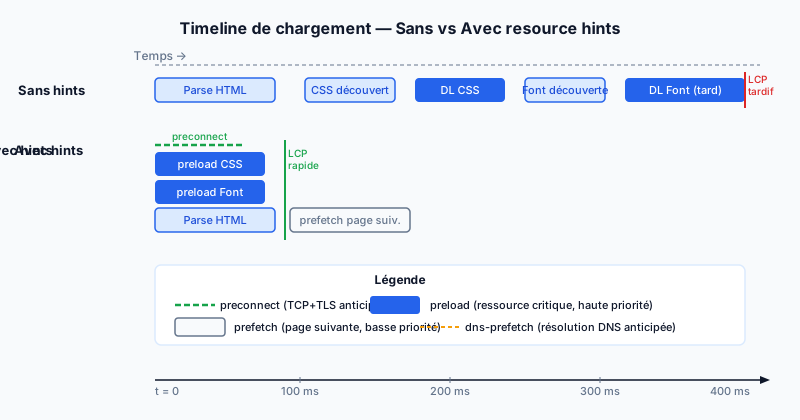
The Problem: The Browser Discovers Resources Too Late
The browser parses HTML from top to bottom. It only discovers a resource — a font, an image, an external CSS file — when it encounters the corresponding tag. For an LCP (Largest Contentful Paint) image placed in the middle of the document, the download doesn't start until after tens of milliseconds of parsing. Resource hints allow you to anticipate this process.
Preload: Critical Resources for the Current Page
preload tells the browser to immediately download a resource needed by the current page, before even encountering it in the HTML. It has high priority and suffers no delay.
<link rel="preload" href="/fonts/inter.woff2" as="font" type="font/woff2" crossorigin>
<link rel="preload" href="/img/hero.webp" as="image" fetchpriority="high">
The as attribute is mandatory: it specifies the resource type (font, image, script, style) so the browser applies the correct caching and security policy. The fetchpriority="high" attribute reinforces priority for the LCP image.
Prefetch: Preparing for the Next Navigation
prefetch loads a resource the user might need in their next navigation — for example, the results page after a search form. The download happens at the lowest priority, in the background, without blocking the current page.
<link rel="prefetch" href="/products/detail.html">
<link rel="prefetch" href="/js/checkout.js">
Only prefetch pages with a high probability of being visited. An unnecessary prefetch wastes bandwidth with no benefit.
Preconnect and dns-prefetch: Anticipating Connections
preconnect establishes the TCP (Transmission Control Protocol) connection and TLS (Transport Layer Security — encryption) handshake in advance to a third-party domain. This saves 100 to 500 ms on the first call to that domain (typically Google Fonts or a CDN — Content Delivery Network).
<link rel="preconnect" href="https://fonts.googleapis.com">
<link rel="preconnect" href="https://fonts.gstatic.com" crossorigin>
dns-prefetch is a lighter version: it only performs DNS (Domain Name System — the internet directory that translates domain names to IP addresses) resolution, without establishing the full connection. It consumes fewer resources but provides less benefit. Use it for less critical domains.
<link rel="dns-prefetch" href="https://analytics.example.com">fetchpriority: Fine-tuning Priorities
The fetchpriority attribute (values: high, low, auto) adjusts download priority without changing when the download is triggered. It is particularly useful on <img> tags to distinguish the LCP image from decorative off-screen images.
<img src="hero.webp" fetchpriority="high" alt="...">
<img src="thumbnail.webp" fetchpriority="low" alt="...">
Abuses to Avoid
Too many preload hints create network contention: the browser downloads everything in parallel, saturating the connection and delaying truly critical resources. The effect can be negative on LCP. Limit preloads to two or three genuinely blocking resources. Check your hints in Chrome DevTools, Network tab: preloaded but unused resources show a yellow warning.
Audit Your Resource Hints
An automated audit detects resources loaded too late, unanticipated third-party connections, and superfluous preloads. Run a free audit to get a prioritized list of resource hints to add to your site.