What Is Permissions-Policy?
Permissions-Policy is an HTTP header that lets a site owner precisely control which browser features are accessible on their pages and inside the iframes (embedded windows) they integrate. It replaces Feature-Policy, which was deprecated as of Chrome 88 (January 2021), with a revised syntax and broader API coverage.
Without this header, any script or iframe loaded on your page can theoretically access your visitor's camera, microphone or geolocation — provided the browser allows it. Permissions-Policy gives you proactive control to restrict that access.
Controllable Features
The list of features managed by Permissions-Policy is extensive. The most common ones include:
- camera — webcam access
- microphone — microphone access
- geolocation — GPS coordinate access
- payment — browser payment API (Payment Request API)
- fullscreen — switching to fullscreen mode
- autoplay — automatic media playback
- clipboard-read and clipboard-write — clipboard access
- usb and serial — communication with physical devices via WebUSB and Web Serial API
Syntax and Possible Values
Each feature accepts a list of allowed origins (domains) in parentheses:
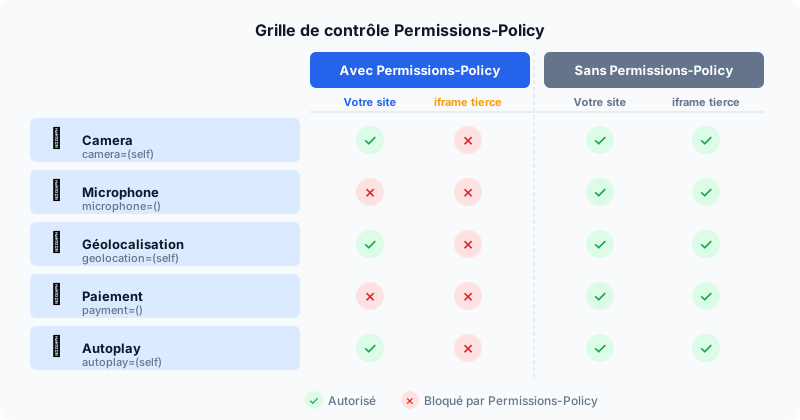
Permissions-Policy: camera=(), microphone=(), geolocation=(self)()— no access: neither your site nor iframes(self)— your origin only (same domain)(*)— all origins (default behavior without header)("https://partner.com")— a specific third-party origin
You can combine multiple values: geolocation=(self "https://maps.example.com").
Apache Configuration
In an .htaccess file or in your Apache VirtualHost configuration:
Header set Permissions-Policy "camera=(), microphone=(), geolocation=(self), fullscreen=(self), payment=()"Make sure the mod_headers module is enabled (a2enmod headers). On Nginx, use add_header Permissions-Policy "..."; inside the server or location block.
Impact on Third-Party Iframes
This is where Permissions-Policy becomes particularly valuable. Advertisements, social network widgets (Like buttons, YouTube videos) and embedded chatbots are loaded via iframes — often from domains you do not control. Without restrictions, these iframes inherit your page's permissions.
With camera=(self), only your own pages can request webcam access. Third-party iframes are automatically denied access, even if the user previously granted global permission in the browser. This significantly reduces the attack surface of malicious third-party scripts (supply chain attacks).
Permissions-Policy complements CSP (Content Security Policy): CSP controls which resources are loaded (scripts, styles, images), while Permissions-Policy controls the capabilities granted to resources that are already loaded.
Testing Your Configuration
In Chrome DevTools, open the Application tab and find the Permissions Policy section. It shows, for each feature, whether it is allowed or blocked on the current page and in each iframe. The online tool securityheaders.com also analyzes your HTTP headers and flags a missing Permissions-Policy.
Audit Your Site Now
Not sure whether your site is exposing sensitive features to third-party scripts? Run a free audit to get a complete report on your security headers, including Permissions-Policy.