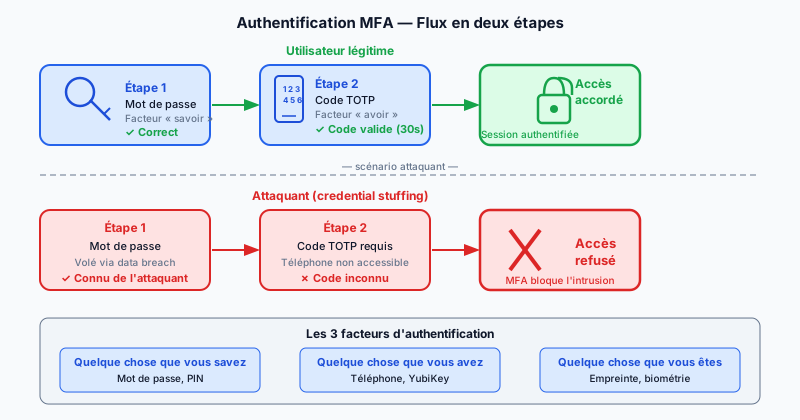
The Three Authentication Factors
Authentication security relies on three categories of identity proof:
- Something you know: password, PIN code.
- Something you have: phone, physical key (YubiKey).
- Something you are: fingerprint, facial recognition (biometrics).
2FA (Two-Factor Authentication) combines exactly two of these categories. MFA (Multi-Factor Authentication) combines two or more. In practice, the terms are often used interchangeably to describe a password paired with a temporary code.
TOTP: Time-Based One-Time Passwords
TOTP (Time-based One-Time Password) is defined by RFC 6238. A shared secret is stored in an app like Google Authenticator or Authy. Every 30 seconds, the app generates a 6-digit code by combining this secret with the current Unix time. The server performs the same calculation and compares the results. This mechanism is offline: no SMS or network connection is needed to generate the code.
SMS 2FA: Convenient but Vulnerable
Sending a code by SMS is the most widespread form of 2FA. It is easy to implement and requires no special app. Its major drawback is vulnerability to SIM swapping (an attack where a fraudster convinces your carrier to transfer your number to their own SIM card). Once your number is hijacked, the attacker receives all your SMS codes. For sensitive accounts, TOTP or passkeys are preferable.
Passkeys and WebAuthn
Passkeys are the next generation of authentication, standardized by FIDO2 (Fast IDentity Online 2) and the WebAuthn (Web Authentication API) protocol. Instead of a password, a cryptographic key pair is generated: the private key stays on the user's device (protected by biometrics or PIN), while the public key is stored on the server. No shared secret travels over the network, eliminating phishing and password theft risks.
Implementation on Your Site
To add TOTP to your application, mature libraries exist in all languages:
- Python:
pyotp— generates and verifies TOTP codes in a few lines. - Node.js:
speakeasy— similar API, compatible with Google Authenticator.
The flow is simple: when enabling 2FA, generate a random secret, display it as a QR code (scannable by the authenticator app), then store it encrypted in the database. Always provide backup codes (single-use emergency codes) in case the phone is lost.
Proven Effectiveness
Google reported that enabling 2FA on Google accounts blocks 99.9% of automated attacks. For a website admin panel, even SMS 2FA drastically reduces intrusion risk from credential stuffing (using lists of stolen username/password pairs). The extra friction for the user is minimal compared to the security benefit.
Secure Access to Your Site
The absence of 2FA on your admin interface is one of the most frequently detected vulnerabilities during audits. Run a free audit to identify unprotected entry points on your site.