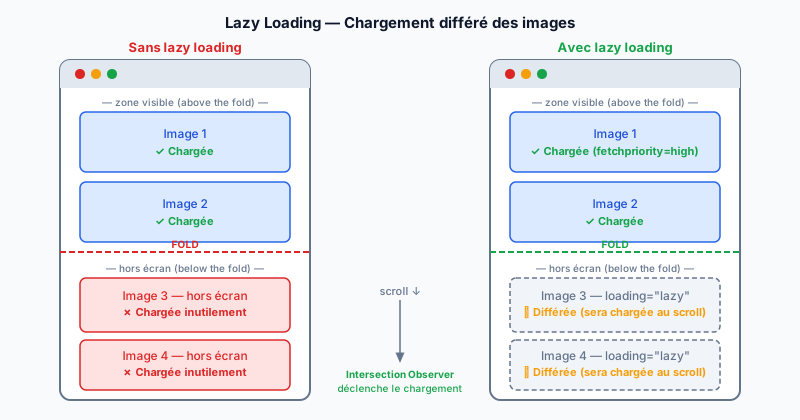
The Problem: Loading Everything Upfront
By default, a browser loads all images in an HTML page as soon as the document is received — even those located far below the viewport (the visible area of the screen). On a long page with many images, this generates dozens of unnecessary HTTP requests at startup, slows down the first render, and wastes bandwidth on resources the user may never see.
The Native loading="lazy" Attribute
Since Chrome 76 and Firefox 75, a single HTML attribute activates lazy loading (deferred loading):
<img src="photo.webp" alt="Description" loading="lazy" width="800" height="600">
The browser automatically calculates whether the image is in the viewport. If it is off-screen, loading is deferred until the user scrolls close to the image. No JavaScript is required. Browser compatibility is now excellent: more than 95% of browsers in use support this attribute.
The Intersection Observer API for Older Browsers
For the few browsers that do not support loading="lazy", the Intersection Observer API (a JavaScript interface that detects when an element enters the viewport) provides a performant alternative. It avoids older patterns based on the scroll event, which triggered calculations on every scroll and hurt performance. With Intersection Observer, the callback is only called at the precise moment the element crosses the viewport boundary.
Width and Height: Mandatory Attributes
Adding width and height to every img tag is essential. Without these attributes, the browser does not know the image dimensions before it loads. It therefore reserves zero height, then resizes the layout when the image arrives — this is called a layout shift. This shift degrades the CLS (Cumulative Layout Shift), a Core Web Vitals metric (Google's web performance indicators).
Never Lazy-Load Above-the-Fold Images
Lazy loading is counterproductive on images visible as soon as the page loads (above-the-fold). In particular, your page's main image — often the hero (large header image) — is typically the LCP (Largest Contentful Paint) element. Delaying its loading directly harms your LCP score. For this image, use instead:
<img src="hero.webp" fetchpriority="high" loading="eager" width="1200" height="600" alt="Hero">
The fetchpriority="high" attribute tells the browser to preload this resource with priority. The rule is simple: lazy loading for everything below the fold, high priority for what is immediately visible.
Impact on PageSpeed and Core Web Vitals
Correct lazy loading implementation reduces the initial page weight, improves LCP (fewer resources competing at startup), and decreases TTI (Time to Interactive — time before the page becomes interactive). Google PageSpeed Insights explicitly flags images without lazy loading as an optimization opportunity. iframe tags also benefit from the loading="lazy" attribute to defer loading of embedded maps or videos.
Optimize Your Images with a Free Audit
Lazy loading is one of the fastest optimizations to deploy for improving your Core Web Vitals. Run a free audit to identify all unoptimized images and performance opportunities on your site.