Why FID Was Insufficient
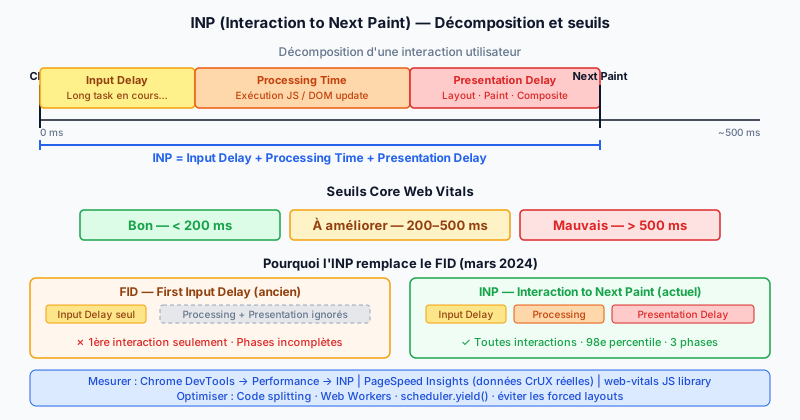
FID (First Input Delay) measured only the delay between the user's first interaction and the moment the browser began processing it. It had two major limitations:
- It only measured the first interaction of the session, ignoring all subsequent interactions (clicks, keystrokes, mobile taps).
- It only captured the Input Delay (wait before processing), not the code execution time or the display delay of the result.
A page could have a good FID but make subsequent interactions very slow — for example after a heavy JavaScript module loaded.
What Is INP?
INP (Interaction to Next Paint) became the official Core Web Vitals metric in March 2024. It measures the delay between a user event (click, tap, keyboard key) and the next visual render (next paint) for all interactions throughout the page's lifetime.
A page's INP score is the 98th percentile of all measured interactions: it is almost the worst case observed, not the average. This approach accurately reflects users' real experience.
INP Broken Down Into Three Phases
Each interaction contributes to INP through three components:
- Input Delay: the wait between the event and the start of handler execution (often caused by a long task running on the main thread).
- Processing Time: the execution time of the JavaScript triggered by the interaction (event handlers, DOM updates).
- Presentation Delay: the time between the end of processing and the actual visual render by the browser (layout calculation, painting).
INP = Input Delay + Processing Time + Presentation Delay.
Thresholds and Classification
Google classifies INP into three categories:
- Good: INP < 200 ms — the page responds smoothly.
- Needs improvement: INP between 200 and 500 ms — optimizations are needed.
- Poor: INP > 500 ms — the user experience is degraded and SEO ranking may be penalized.
Causes of High INP and Optimizations
The main causes of poor INP:
- Long JavaScript tasks (tasks > 50 ms on the main thread) that block interaction processing.
- Heavy event handlers triggering CSS recalculations or forced reflows.
- Costly rendering when DOM updates are too large in a single cycle.
Recommended optimizations:
- Code splitting: load JavaScript only when it is needed.
- Web Workers: offload heavy computations off the main thread.
- scheduler.yield(): yield the thread between tasks to allow interaction processing.
- isInputPending API: check whether a user input is waiting before continuing a long task.
- Avoid forced layouts by reading geometric properties before modifying the DOM.
Measuring INP
Several tools allow you to measure and diagnose INP:
- Chrome DevTools → Performance tab → record a session and look for interactions marked "INP" in the interactions view.
- PageSpeed Insights: shows real-world INP (CrUX — Chrome User Experience Report data) and lab INP.
- web-vitals JavaScript library: measures INP in production on your real users.
Improve Your INP Score With an Audit
A high INP degrades user experience and can impact your Google ranking. Run a free audit to identify pages on your site with a problematic INP and get concrete optimization recommendations.