The Limits of HTTP/1.1
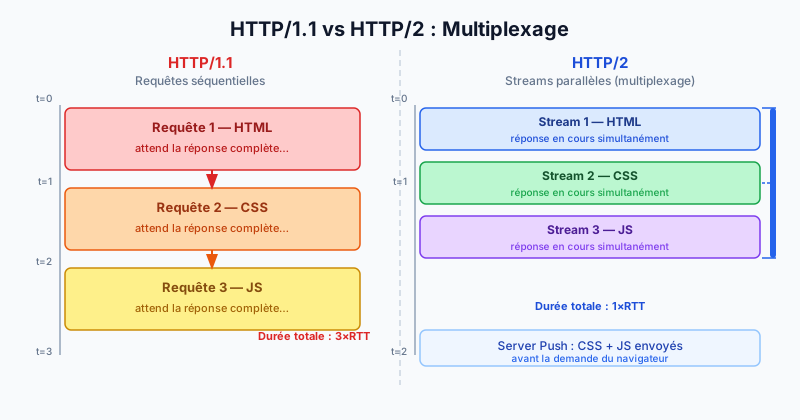
HTTP/1.1 (HyperText Transfer Protocol version 1.1), published in 1999, imposes a sequential communication model: each request must wait for the previous response before being sent over the same TCP (Transmission Control Protocol) connection. This bottleneck is called head-of-line blocking.
To work around this, browsers open up to 6 simultaneous TCP connections per domain. This approach consumes more server resources and is still insufficient for modern pages that load dozens of resources (CSS, JavaScript, images, fonts).
HTTP/2 Multiplexing
HTTP/2 (standardised by the IETF in 2015 via RFC 7540) solves this with multiplexing: multiple requests and responses travel simultaneously over a single TCP connection as independent streams.
In practice, a browser can send 20 requests in parallel without waiting for intermediate responses. Each stream has a unique identifier and data is split into frames that interleave on the connection. The server and client reassemble responses in the correct order.
HPACK Header Compression
In HTTP/1.1, headers are sent as plain text with every request — often dozens of repetitive fields like User-Agent, Accept-Encoding or cookies. On a page with 80 resources, this amounts to tens of kilobytes of redundant data.
HTTP/2 introduces HPACK, a compression algorithm designed specifically for HTTP headers. It maintains a lookup table on both client and server sides: a previously sent header is referenced by a simple numeric index instead of being retransmitted in full. Savings can reach 85 to 90% on repetitive headers.
Server Push: Anticipating Browser Needs
Server Push allows the server to send resources to the browser before it even requests them. For example, when a client requests index.html, the server can simultaneously push style.css and app.js without waiting for the browser to parse the HTML and discover those dependencies.
This feature reduces network round trips (RTT, Round-Trip Time) that are often the bottleneck on high-latency connections.
Enabling HTTP/2 on Apache
On Apache 2.4.17+, enable the mod_http2 module and configure the protocols in your VirtualHost:
a2enmod http2
Then in your configuration:
Protocols h2 http/1.1
HTTP/2 requires TLS (Transport Layer Security) for virtually all modern browsers. Make sure your SSL certificate is in place before enabling h2.
Verifying Activation with curl
The curl command with the --http2 flag lets you verify which protocol is in use:
curl --http2 -I https://your-site.comIf the response shows HTTP/2 200, your server supports HTTP/2. Otherwise you will see HTTP/1.1 200 and should check your configuration.
Get a Full HTTP/2 Review with a Free Audit
Enabling HTTP/2 is only one part of performance optimisation. TLS configuration, caching, minification and stream prioritisation all play a role too. Run a free audit to identify every bottleneck on your site and get an actionable improvement plan.