The Problem with Multilingual Sites
A site offering multiple language versions faces a major challenge: Google may show the wrong version to a user. A French-speaking visitor in Belgium might land on the English version of your site, simply because search engines don't know which page to serve them.
The hreflang attribute solves this problem by explicitly telling Google the language and region targeted by each version of your pages.
Syntax and Standard Codes
hreflang is implemented via a <link> tag in the <head> of each page:
<link rel="alternate" hreflang="fr" href="https://example.com/fr/" />
<link rel="alternate" hreflang="en" href="https://example.com/en/" />
<link rel="alternate" hreflang="x-default" href="https://example.com/" />
Language codes follow the ISO 639-1 standard: fr for French, en for English, de for German. To target a specific region, combine language and country using the ISO 3166-1 standard: fr-FR for France, fr-BE for Belgium, fr-CA for French-speaking Canada.
The Role of x-default
The hreflang="x-default" value designates the default page shown when no version matches the user's language or region. This is often the international homepage or the English version.
Example: a Japanese visitor arriving on your site will see the x-default version if you don't offer a Japanese version.
Three Implementation Methods
You can declare hreflang attributes in three different ways:
- HTML tags in the
<head>: the most common method and the easiest to verify. - HTTP headers: suited for non-HTML files (PDFs, downloadable files). The tag is added in the server response.
- XML Sitemap: practical for large sites, consolidating all hreflang declarations in a single file.
Google accepts all three methods; however, avoid combining them for the same page, as this could create conflicts.
The Most Common Mistake: Non-Reciprocity
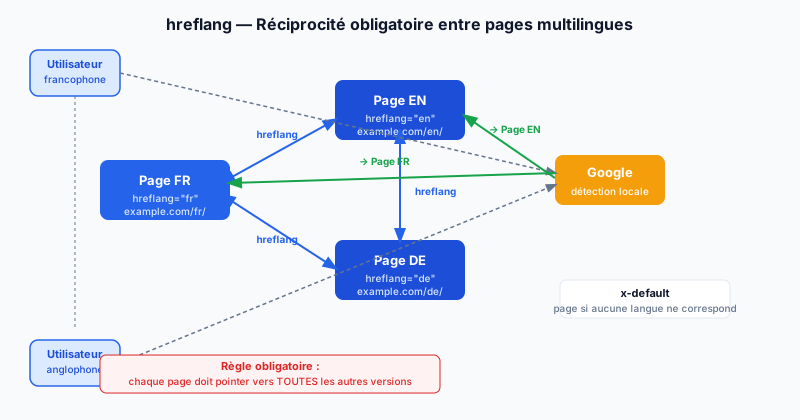
The fundamental rule of hreflang is reciprocity: every page must point to all other versions, and those versions must point back to it.
If your French page points to the English page but the English page doesn't point back to the French one, Google considers the declaration invalid and ignores it. The result: the wrong content continues to be served to the wrong users.
On a site with 3 languages (FR, EN, DE), each page must contain 3 hreflang tags: one pointing to itself and one for each other version.
Verifying and Fixing Your hreflang
Google Search Console reports hreflang errors in the "International Targeting" section. It lists missing pages, inconsistencies, and unreachable URLs. Third-party tools like hreflang.org or Screaming Frog also allow you to audit the entire site.
hreflang errors are often invisible on the surface but significantly penalize international traffic. Run a free audit to detect missing or non-reciprocal declarations on your multilingual site.