Plain-Text DNS: A Privacy Problem
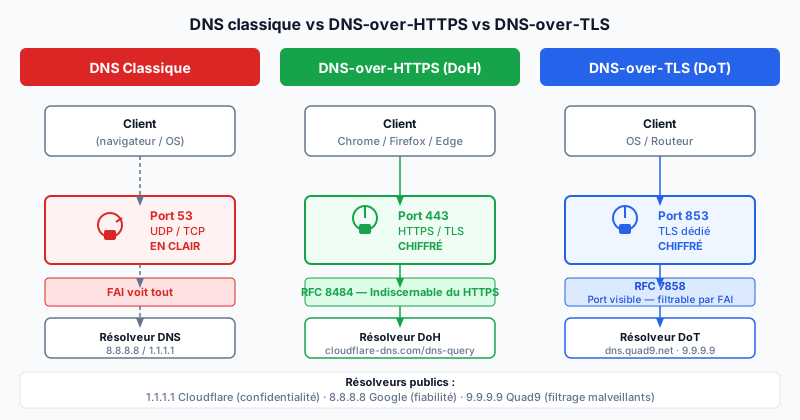
Every time you visit a site, your browser sends a DNS (Domain Name System — the internet directory that translates domain names to IP addresses) query to resolve the domain name. This query travels over port 53, in plain text, with no encryption. Your ISP (Internet Service Provider) therefore sees every domain you visit, even if the connection to the site itself uses HTTPS.
This unencrypted traffic exposes you to several risks: ISP surveillance (for commercial or legal purposes), DNS hijacking (malicious modification of DNS responses), and man-in-the-middle attacks (interception of traffic between you and the resolver).
DoH: DNS-over-HTTPS
DoH (DNS-over-HTTPS), standardized in RFC 8484 (2018), encapsulates DNS queries inside standard HTTPS requests on port 443. The traffic is encrypted with TLS and indistinguishable from ordinary web traffic. Neither the ISP nor an attacker on the network can identify DNS queries.
DoH is natively supported by Chrome (since 2020), Firefox, and Edge. In Firefox, the configuration is straightforward:
Settings → Privacy & Security
→ DNS over HTTPS → Enable → Choose provider
In Chrome: chrome://settings/security → enable "Use secure DNS".
DoT: DNS-over-TLS
DoT (DNS-over-TLS), standardized in RFC 7858 (2016), encrypts DNS queries with TLS on a dedicated port: port 853. Unlike DoH, DoT traffic is identifiable by ISPs and network administrators (distinct port), making it easier to filter — some enterprise networks deliberately block it. DoT is generally configured at the operating system or router level, not the browser.
DNSSEC: Complementary, Not Equivalent
DNSSEC (DNS Security Extensions) cryptographically signs DNS responses to guarantee their authenticity: you can be sure the response comes from the correct server and has not been altered. However, DNSSEC does not encrypt queries — they remain visible on the network. DoH and DoT protect confidentiality. DNSSEC protects integrity. These two mechanisms are complementary.
Public DNS Resolvers Supporting DoH/DoT
- 1.1.1.1 (Cloudflare):
https://cloudflare-dns.com/dns-query— privacy-focused, fast. - 8.8.8.8 (Google):
https://dns.google/dns-query— very reliable, but Google collects data. - 9.9.9.9 (Quad9):
https://dns.quad9.net/dns-query— filters malicious domains, no commercial logs.
Audit Your Site's DNS Security
Your site's DNS security (DNSSEC, SPF records, DMARC, CAA) can be checked automatically. Run a free audit to identify DNS configuration flaws that expose your domain to hijacking or spoofing attacks.