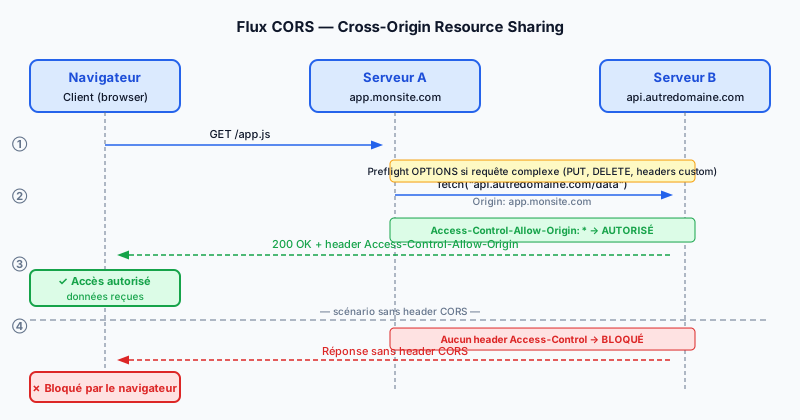
What Is the Same-Origin Policy?
The SOP (Same-Origin Policy) is a security rule enforced by every modern browser. It prevents a script loaded from one origin from accessing resources of another origin. An origin is defined by three components: protocol (http or https), domain name, and port. Therefore, https://api.example.com and https://app.example.com are two distinct origins.
Why Does CORS Exist?
Without the SOP, a malicious script could read your bank cookies or authentication tokens from any website. CORS (Cross-Origin Resource Sharing) is the standard mechanism that lets the target server relax this restriction in a controlled way. The server explicitly declares which origins are allowed to consume its resources.
The Access-Control Headers
When a browser makes a cross-origin request, it automatically sends the Origin header. The server responds with several CORS headers:
- Access-Control-Allow-Origin: indicates the allowed origin (e.g.
https://app.example.com) or*for all origins. - Access-Control-Allow-Methods: lists the accepted HTTP methods (GET, POST, PUT…).
- Access-Control-Allow-Headers: lists the allowed custom headers (e.g.
Authorization,Content-Type). - Access-Control-Max-Age: seconds the browser can cache the preflight response.
The OPTIONS Preflight Request
For so-called non-simple requests (PUT, DELETE methods, or a custom header), the browser first sends a preflight request using the HTTP OPTIONS method. This preliminary request checks that the server accepts the actual request before sending it. If the server responds with the correct CORS headers, the browser then performs the main request. A misconfigured server that does not handle OPTIONS will return a CORS error.
The Wildcard * and Credentials
Using Access-Control-Allow-Origin: * is convenient for public APIs but dangerous for authenticated APIs. When the client must send cookies or a token (withCredentials: true in JavaScript), the server must:
- Specify an exact origin in
Access-Control-Allow-Origin(the wildcard*is forbidden with credentials). - Add
Access-Control-Allow-Credentials: true.
Missing these rules exposes your users to CSRF (Cross-Site Request Forgery) attacks.
Apache Configuration
In Apache, enable the mod_headers module then add in your VirtualHost or .htaccess:
Header set Access-Control-Allow-Origin "https://app.example.com"
Header set Access-Control-Allow-Methods "GET, POST, OPTIONS"
Header set Access-Control-Allow-Headers "Authorization, Content-Type"
The most common mistakes are: forgetting to handle the OPTIONS method, specifying an origin with a trailing slash (https://app.example.com/ instead of https://app.example.com), or leaving * on a route that accepts cookies.
Audit Your CORS Configuration
A misconfigured CORS policy can expose your user data to malicious third-party sites. Run a free audit to detect CORS vulnerabilities and missing security headers on your site.