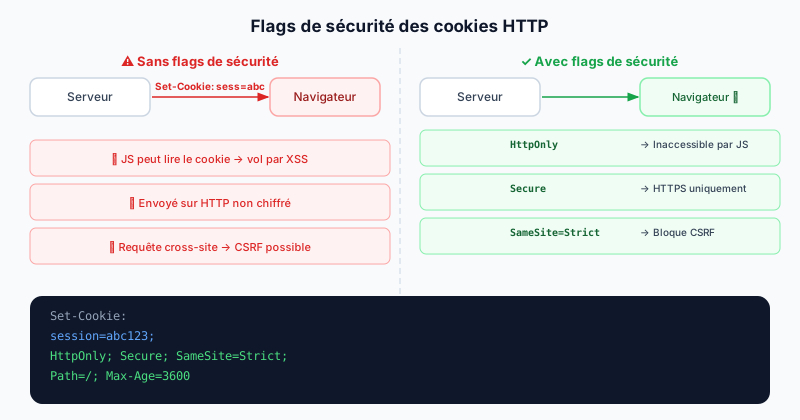
Why secure cookies?
An HTTP cookie is a small data file stored in your visitor's browser. It is used to maintain user sessions (staying logged in), remember preferences, or track site navigation. The problem: by default, a cookie is exposed to many threats. Security flags (configuration attributes) are instructions you add to the Set-Cookie header to drastically reduce this attack surface.
HttpOnly: inaccessible to JavaScript
Without this flag, any JavaScript code running on your page can read the cookie via document.cookie. An attacker who has succeeded with an XSS (Cross-Site Scripting — execution of malicious scripts in a legitimate site's context) attack can steal the session cookie and impersonate a logged-in user — often called session hijacking.
HttpOnly prevents JavaScript access to the cookie: only the browser can automatically send it with HTTP requests. The cookie remains opaque to any script, even legitimate ones.
Set-Cookie: session=abc123; HttpOnlySecure: HTTPS only
Without this flag, the browser sends the cookie over any HTTP connection, even unencrypted ones. On a public Wi-Fi network, an attacker can intercept traffic and retrieve the cookie in plain text — this is a man-in-the-middle attack (traffic interception). The Secure flag ensures the cookie is only transmitted over encrypted HTTPS connections.
Set-Cookie: session=abc123; Secure; HttpOnlySameSite: block CSRF
CSRF (Cross-Site Request Forgery) exploits the fact that the browser automatically sends cookies with any request to your site, even if that request is initiated from another malicious site. An attacker can trigger actions without the user's knowledge (payment validation, password change) by having them click a crafted link.
SameSite controls when the cookie is sent during cross-site requests:
- Strict: cookie never sent during cross-site navigation → maximum protection, but may break some OAuth flows
- Lax (recommended default): cookie sent on link clicks but blocked for automatic requests (images, POST forms) → good security/UX balance
- None: always sent — requires
Secureflag
Set-Cookie: session=abc123; Secure; HttpOnly; SameSite=Lax; Path=/; Max-Age=3600Configure on Apache
<IfModule mod_headers.c>
  Header always edit Set-Cookie ^(.*)$ "$1; Secure; HttpOnly; SameSite=Lax"
</IfModule>
The Path and Max-Age attributes
Path=/: the cookie is sent for all URLs on the site (recommended for session cookies). Max-Age=3600: lifetime in seconds (3600 = 1 hour). Without Max-Age or Expires, it is a session cookie and disappears when the browser closes.
Check your cookies
TheSiteFuse inspects your site's Set-Cookie headers and checks for the Secure, HttpOnly and SameSite flags. Run a free audit for an immediate report on your cookies' security.