Why an SSL certificate is essential
An SSL/TLS (Secure Sockets Layer / Transport Layer Security — communication encryption protocols) certificate is the foundation of web security. It serves two roles: encrypting communications between the browser and server (no third party can read data in transit), and authenticating the server's identity (visitors are assured they are talking to your site and not an impostor).
Without a valid certificate, browsers display a blocking security warning that drives away the majority of visitors. Google has also penalised sites without HTTPS in its rankings since 2014.
The SSL chain of trust
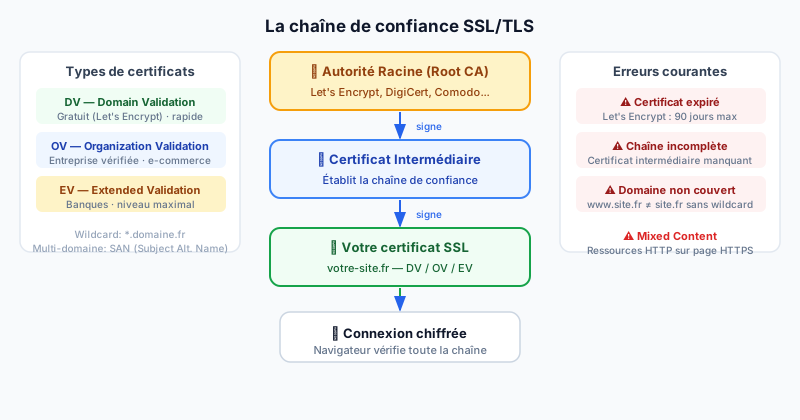
An SSL certificate works through a chain of trust (certificate chain): your certificate is signed by a Certificate Authority (CA), which is itself recognised by browsers. In practice:
- A Root CA like Let's Encrypt or DigiCert signs an intermediate certificate
- This intermediate certificate signs your domain certificate
- The browser verifies the entire chain before displaying the padlock
Types of SSL certificates
- DV (Domain Validation): only verifies you control the domain. Free with Let's Encrypt, issued in minutes. Sufficient for most sites.
- OV (Organization Validation): verifies the legal existence of the company. Recommended for professional and e-commerce sites.
- EV (Extended Validation): in-depth verification. Used by banks and large institutions.
- Wildcard (
*.domain.com): covers the domain and all its subdomains with a single certificate. - SAN (Subject Alternative Name): a single certificate for several different domains.
Let's Encrypt: free and automatic certificates
Let's Encrypt revolutionises SSL management: free, trusted by all browsers, and automatically renewed with Certbot:
sudo apt install certbot python3-certbot-apache
sudo certbot --apache -d your-site.com -d www.your-site.com
# Automatic renewal is configured via cron
Common errors to avoid
- Expired certificate: Let's Encrypt expires after 90 days. Automate renewal with
certbot renew. - Incomplete chain: the intermediate certificate is missing — some browsers then reject the connection.
- Domain mismatch: the certificate covers
www.site.combut notsite.com, or vice versa. - Mixed Content: resources loaded over HTTP (images, scripts) on an HTTPS page cancel the protection and trigger browser warnings.
Check your certificate
TheSiteFuse automatically inspects your certificate's validity, expiry date, chain completeness, and domain coverage. Run a free audit to instantly detect any issue.