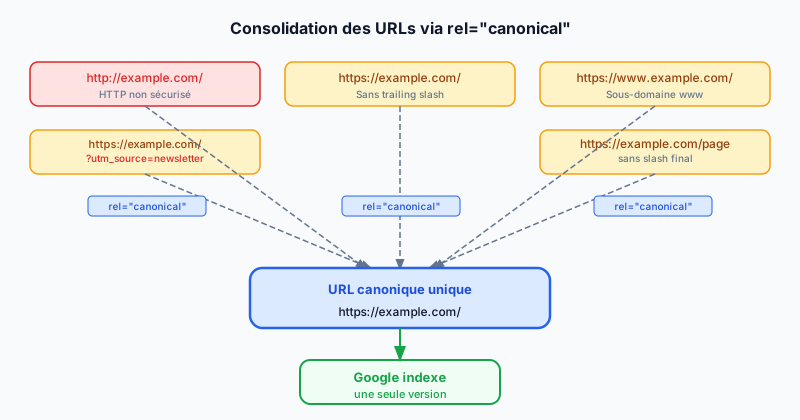
The Duplicate Content Problem
Duplicate content occurs when the same content is accessible through multiple different URLs. Google must then choose which version to index and which to give SEO authority — a choice that may not match your intentions. Sources of duplication are numerous: www vs non-www, http vs https, trailing slash presence or absence, and URL parameters like UTMs (marketing tracking parameters) or session identifiers.
The link rel="canonical" Tag
The canonical tag is a <link> element placed in the <head> of the HTML page. It tells Google which is the preferred (canonical) version of a page among multiple variants:
<link rel="canonical" href="https://example.com/my-page/" />Google respects it in the vast majority of cases, without 100% guarantee — it is a strong signal, not an absolute directive. It can also be sent via the HTTP header Link: <url>; rel="canonical", useful for PDF files or non-HTML resources.
Self-Referencing and Cross-Domain Canonical
Every page should contain a canonical tag pointing to itself. This is self-referencing canonicalization: it prevents Google from choosing another URL as the default canonical version. For content syndication (publishing the same article on multiple sites), the republishing site must set its canonical to the original source, preserving the SEO authority of the originating site.
E-commerce Case: Filters and URL Variants
E-commerce sites are particularly exposed. Navigation filters (color, size, price) generate URLs like /shoes?color=red&size=42. These pages often display a subset of the same catalog — nearly identical content, different URL. The solution: each filtered URL should point its canonical to the main category page without parameters.
Same logic for marketing campaign parameters (UTM): /page?utm_source=newsletter should have a canonical pointing to /page.
Pagination and rel="next"/"prev"
Google dropped support for rel="next" and rel="prev" attributes (used to signal paginated pages) in March 2019. The current recommendation is to use a canonical on each paginated page pointing to the first page of the series, or — better — to ensure each pagination page has sufficiently distinct content to be indexed independently.
Common Mistakes
Several frequent errors reduce the effectiveness of canonicals:
- Multiple canonical tags on the same page: Google ignores all of them and chooses itself.
- Canonical pointing to a 301 redirect page: always use the final destination URL.
- Canonical blocked by robots.txt: Googlebot cannot read the tag if it cannot access the page.
- Canonical pointing to a noindex page: a logical contradiction to avoid.
- Relative URLs instead of absolute in the canonical tag.
Audit Your Canonicals with TheSiteFuse
Misconfigured canonicals dilute your SEO authority across dozens of URL variants. Run a free audit to identify pages without a canonical, canonicalization conflicts, and problematic redirect chains.